PostgreSQL
The PostgreSQL integration supports three backup strategies, each suited for different requirements.
| Protocol | Mechanism | Restore target |
|---|---|---|
postgres:// |
Logical dump via pg_dump / pg_dumpall |
A running PostgreSQL server |
postgres+aws:// |
Same as above, authenticated with an AWS IAM token | A running PostgreSQL server |
postgres+bin:// |
Physical base backup via pg_basebackup |
Any file-restore connector |
Typical use cases
- Scheduled logical backups of application databases with cross-version portability.
- RDS or Aurora backups authenticated via IAM without static credentials.
- Full-cluster physical snapshots for fast, file-level disaster recovery.
- Selective database or schema restores from a full-cluster dump.
Installation
The PostgreSQL integration is distributed as a Plakar package.
Pre-compiled packages are available for common platforms and provide the simplest installation method.
Note
Logging In Pre-built packages require Plakar authentication. See Logging in to Plakar for details.
Install the PostgreSQL package:
$ plakar pkg add postgresqlVerify installation:
$ plakar pkg showSource builds are useful when pre-built packages are unavailable or when customization is required.
Prerequisites:
- Go toolchain compatible with your Plakar version
Build the package:
$ plakar pkg build postgresqlA package archive will be created in the current directory (e.g.,
postgresql_v1.0.0_darwin_arm64.ptar).
Install the package:
$ plakar pkg add -allow-unsigned ./postgresql_v1.0.0_darwin_arm64.ptarVerify installation:
$ plakar pkg showTo list, upgrade, or remove the package, see the managing packages guide.
Logical backup - postgres://
How it works
PostgreSQL integration connects to a running PostgreSQL server and produces a
logical dump which is a portable, SQL-level representation of the data using
pg_dump and pg_dumpall.
Every snapshot follows the same layout:
/00000-globals.sql: roles and tablespaces for the whole cluster (pg_dumpall --globals-only)./00001-<dbname>.dump,/00002-<dbname>.dump, …: onepg_dump -Fccustom-format file per database, numbered alphabetically.
When a single database is specified, only that database is dumped alongside
the globals file. When no database is specified, every database with
datallowconn = true is dumped (excluding template0). A /manifest.json
record capturing cluster-level metadata is also written to each snapshot before
the dump data.
Restore dispatches on file name and extension: .dump files are fed to
pg_restore; 00000-globals.sql is fed to psql automatically.
Pros
- Portable across PostgreSQL major versions. You can dump on PG 15, restore on PG 16.
- Selectively back up individual databases or the whole cluster.
- Supports selective table or schema restore with
pg_restore -t. - No server downtime required.
Cons
- Requires a live, accessible PostgreSQL server for both backup and restore.
- Does not capture low-level objects (e.g. unlogged table contents, certain system catalog details).
- Restore time scales with data volume.
Prerequisites
The following PostgreSQL client tools must be available in $PATH on the
machine running Plakar (typically provided by the postgresql-client package):
pg_dump,pg_dumpall: for backuppg_restore,psql: for restore and connectivity checks
The backup user should be a superuser so that pg_dumpall can include role
passwords from pg_authid. On managed services such as Amazon RDS, where the
administrative user is a restricted superuser, the integration cannot read role
passwords from pg_authid. It automatically passes --no-role-passwords to
pg_dumpall and logs a warning. The dump is otherwise complete, but restored
roles will have no password set.
Source connector
flowchart LR
subgraph Source["PostgreSQL Server"]
  DB["Databases"]
end

subgraph Plakar["Plakar"]
  Connector["pg_dump / pg_dumpall"]
  Transform["Encrypt & deduplicate"]

  Connector --> Transform
end

Store["Kloset Store"]

DB --> Connector
Transform --> Store
# Back up a single database
$ plakar source add mypg postgres://postgres:secret@db.example.com/myapp
$ plakar at /var/backups backup "@mypg"

# Back up all databases (roles, tablespaces, and data)
$ plakar source add mypg postgres://postgres:secret@db.example.com/
$ plakar at /var/backups backup "@mypg"
Source options
| Option | Default | Description |
|---|---|---|
location |
— | Connection URI: postgres://[user[:password]@]host[:port][/database] |
host |
localhost |
Server hostname. Overrides the URI host. |
port |
5432 |
Server port. Overrides the URI port. |
username |
— | PostgreSQL username. Overrides the URI user. |
password |
— | PostgreSQL password. Overrides the URI password. |
database |
— | Database to back up. If omitted, all connectable databases are backed up. Overrides the URI path. |
exclude_databases |
— | Comma-separated list of database names to skip during a full backup. Has no effect when a single database is selected. |
compress |
false |
Enable pg_dump compression. Disabled by default so Plakar’s own compression and deduplication can operate on uncompressed data. |
schema_only |
false |
Dump only the schema (no data). Mutually exclusive with data_only. |
data_only |
false |
Dump only the data (no schema). Mutually exclusive with schema_only. |
pg_bin_dir |
— | Directory containing the PostgreSQL client binaries. When omitted, binaries are resolved via $PATH. Useful when multiple PostgreSQL versions are installed. |
ssl_mode |
prefer |
SSL mode: disable, allow, prefer, require, verify-ca, or verify-full. |
ssl_cert |
— | Path to the client SSL certificate file (PEM). |
ssl_cert_data |
— | Inline PEM content of the client SSL certificate. Alternative to ssl_cert. |
ssl_key |
— | Path to the client SSL private key file (PEM). |
ssl_key_data |
— | Inline PEM content of the client SSL private key. Alternative to ssl_key. |
ssl_root_cert |
— | Path to the root CA certificate used to verify the server (PEM). |
ssl_root_cert_data |
— | Inline PEM content of the root CA certificate. Alternative to ssl_root_cert. |
Destination connector
flowchart LR
Store["Kloset Store"]

subgraph Plakar["Plakar"]
  Transform["Decrypt & reconstruct"]
  Connector["pg_restore / psql"]

  Transform --> Connector
end

subgraph Destination["PostgreSQL Server"]
  DB["Databases"]
end

Store --> Transform
Connector --> DB
# Restore into an existing database (database must already exist)
$ plakar destination add mypgdst postgres://postgres:secret@db.example.com/myapp
$ plakar at /var/backups restore -to "@mypgdst" <snapshot_id>

# Drop objects first, then restore (database must exist)
$ plakar destination add mypgdst postgres://postgres:secret@db.example.com/myapp \
  clean=true
$ plakar at /var/backups restore -to "@mypgdst" <snapshot_id>

# Drop and recreate the database entirely (safe for fresh or existing clusters)
$ plakar destination add mypgdst postgres://postgres:secret@db.example.com/ \
  recreate=true
$ plakar at /var/backups restore -to "@mypgdst" <snapshot_id>

# Restore a single database from a full backup
$ plakar destination add mypgdst postgres://postgres:secret@db.example.com/ \
  databases=myapp recreate=true
$ plakar at /var/backups restore -to "@mypgdst" <snapshot_id>

# Restore, skipping owner assignment (useful when roles differ on the target)
$ plakar destination add mypgdst postgres://postgres:secret@db.example.com/myapp \
  no_owner=true
$ plakar at /var/backups restore -to "@mypgdst" <snapshot_id>
Destination options
| Option | Default | Description |
|---|---|---|
location |
— | Connection URI: postgres://[user[:password]@]host[:port][/database] |
host |
localhost |
Server hostname. Overrides the URI host. |
port |
5432 |
Server port. Overrides the URI port. |
username |
— | PostgreSQL username. Overrides the URI user. |
password |
— | PostgreSQL password. Overrides the URI password. |
database |
— | Target database for pg_restore. If omitted, the name is inferred from the dump filename. Not used with recreate. |
databases |
— | Comma-separated list of database names to restore from a full backup. Only matching .dump files are restored; globals are always included unless no_globals=true. |
clean |
false |
Drop objects within the target database before recreating them (--clean --if-exists). The database must already exist. Mutually exclusive with recreate. |
recreate |
false |
Drop and recreate the target database from the archive metadata (-C --clean --if-exists). The postgres database is never dropped. Mutually exclusive with clean. |
no_globals |
false |
Skip restoring 00000-globals.sql. Set to true when the target server already has the required roles and tablespaces. |
no_owner |
false |
Skip ALTER OWNER statements (--no-owner). Useful when roles from the source server do not exist on the target. |
schema_only |
false |
Restore only the schema (no data). Mutually exclusive with data_only. |
data_only |
false |
Restore only the data (no schema). Mutually exclusive with schema_only. |
exit_on_error |
false |
Stop on the first restore error. Applies to both pg_restore (-e) and psql (ON_ERROR_STOP=1). |
pg_bin_dir |
— | Directory containing the PostgreSQL client binaries. When omitted, binaries are resolved via $PATH. |
ssl_mode |
prefer |
SSL mode: disable, allow, prefer, require, verify-ca, or verify-full. |
ssl_cert |
— | Path to the client SSL certificate file (PEM). |
ssl_cert_data |
— | Inline PEM content of the client SSL certificate. Alternative to ssl_cert. |
ssl_key |
— | Path to the client SSL private key file (PEM). |
ssl_key_data |
— | Inline PEM content of the client SSL private key. Alternative to ssl_key. |
ssl_root_cert |
— | Path to the root CA certificate used to verify the server (PEM). |
ssl_root_cert_data |
— | Inline PEM content of the root CA certificate. Alternative to ssl_root_cert. |
Logical backup with AWS IAM - postgres+aws://
How it works
postgres+aws:// performs the same logical backup as postgres:// but
authenticates using a short-lived IAM token rather than a static password. The
token is generated automatically via the AWS SDK before pg_dump or
pg_dumpall runs, using the standard SDK credential chain (environment
variables, ~/.aws/credentials, EC2/ECS instance metadata, and so on). No
password parameter is needed or accepted.
The backup output is identical to postgres:// and can be restored with the
same postgres:// destination connector.
AWS setup
Enable IAM authentication on the RDS instance
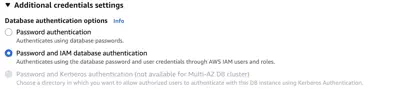
Enable IAM database authentication on the RDS instance via the AWS console, CLI, or Terraform. This can be set at creation time or toggled on an existing instance.
Create an IAM policy with rds-db:connect
Attach the following policy to the IAM user or role that will run Plakar. See Managing IAM Roles, Users, and Access Keys for instructions on creating policies and attaching them to a user or role.
{
  "Version": "2012-10-17",
  "Statement": [
    {
      "Effect": "Allow",
      "Action": "rds-db:connect",
      "Resource": "arn:aws:rds-db:REGION:ACCOUNT_ID:dbuser:DB_RESOURCE_ID/DB_USER"
    }
  ]
}REGION: e.g.eu-west-3ACCOUNT_ID: your 12-digit AWS account IDDB_RESOURCE_ID: the RDS instance resource ID (e.g.db-ABCDEFGHIJKL1234), found in the RDS console under ConfigurationDB_USER: the PostgreSQL username Plakar will connect as
Create the PostgreSQL user with IAM login
Connect to the database as a superuser and run:
CREATE USER myuser WITH LOGIN;
GRANT rds_iam TO myuser;
The user must not have a password set as authentication is handled entirely via the IAM token.
Providing credentials
Suitable for local testing:
export AWS_ACCESS_KEY_ID=AKIAIOSFODNN7EXAMPLE
export AWS_SECRET_ACCESS_KEY=wJalrXUtnFEMI/K7MDENG/bPxRfiCYEXAMPLEKEY
export AWS_REGION=eu-west-3

$ plakar source add myrds \
  postgres+aws://myuser@mydb.cluster-xyz.eu-west-3.rds.amazonaws.com/myapp \
  region=eu-west-3 ssl_mode=require
$ plakar at /var/backups backup "@myrds"
If your IAM user requires a session token (assumed role, temporary credentials):
export AWS_SESSION_TOKEN=AQoDYXdzEJr...Suitable for local testing with a shared credentials file:
# ~/.aws/credentials
[default]
aws_access_key_id     = AKIAIOSFODNN7EXAMPLE
aws_secret_access_key = wJalrXUtnFEMI/K7MDENG/bPxRfiCYEXAMPLEKEY
# ~/.aws/config
[default]
region = eu-west-3The SDK picks up the profile automatically. To use a named profile:
export AWS_PROFILE=myprofile
$ plakar at /var/backups backup "@myrds"
The recommended approach for production. Attach an IAM role with the
rds-db:connect policy to the EC2 instance running Plakar. No credentials need
to be configured. The SDK retrieves short-lived credentials from the instance
metadata service automatically.
$ plakar source add myrds \
  postgres+aws://myuser@mydb.cluster-xyz.eu-west-3.rds.amazonaws.com/myapp \
  region=eu-west-3 ssl_mode=require
$ plakar at /var/backups backup "@myrds"
Source connector
# Back up a single RDS database
$ plakar source add myrds \
  postgres+aws://myuser@mydb.cluster-xyz.us-east-1.rds.amazonaws.com/myapp \
  region=us-east-1 ssl_mode=require
$ plakar at /var/backups backup "@myrds"

# Back up all databases on an RDS instance
$ plakar source add myrds \
  postgres+aws://myuser@mydb.cluster-xyz.us-east-1.rds.amazonaws.com/ \
  region=us-east-1 ssl_mode=require
$ plakar at /var/backups backup "@myrds"
Source options
| Option | Default | Description |
|---|---|---|
location |
— | Connection URI: postgres+aws://[user@]host[:port][/database]. No password component. The IAM token is fetched automatically. |
host |
localhost |
RDS instance hostname. Overrides the URI host. |
port |
5432 |
RDS instance port. Overrides the URI port. |
username |
— | PostgreSQL username. Must be an IAM-enabled database user. Overrides the URI user. |
region |
— | AWS region of the RDS instance (required), e.g. us-east-1. |
database |
— | Database to back up. If omitted, all connectable databases are backed up. Overrides the URI path. |
exclude_databases |
rdsadmin |
Comma-separated list of database names to skip. Defaults to rdsadmin (an internal AWS system database). Set to an empty string to disable all exclusions. |
compress |
false |
Enable pg_dump compression. Disabled by default so Plakar’s own compression and deduplication can operate on uncompressed data. |
schema_only |
false |
Dump only the schema (no data). Mutually exclusive with data_only. |
data_only |
false |
Dump only the data (no schema). Mutually exclusive with schema_only. |
pg_bin_dir |
— | Directory containing the PostgreSQL client binaries. When omitted, binaries are resolved via $PATH. |
ssl_mode |
prefer |
SSL mode. IAM authentication requires an encrypted connection — use require or higher. |
ssl_cert |
— | Path to the client SSL certificate file (PEM). |
ssl_cert_data |
— | Inline PEM content of the client SSL certificate. Alternative to ssl_cert. |
ssl_key |
— | Path to the client SSL private key file (PEM). |
ssl_key_data |
— | Inline PEM content of the client SSL private key. Alternative to ssl_key. |
ssl_root_cert |
— | Path to the root CA certificate used to verify the server (PEM). |
ssl_root_cert_data |
— | Inline PEM content of the root CA certificate. Alternative to ssl_root_cert. |
Destination connector
The postgres+aws:// destination connector supports the same options as
postgres://, minus password, plus region. An IAM token is generated
automatically and used as the connection password.
# Restore into an existing database on RDS
$ plakar destination add myrds \
  postgres+aws://myuser@mydb.cluster-xyz.us-east-1.rds.amazonaws.com/myapp \
  region=us-east-1 ssl_mode=require
$ plakar at /var/backups restore -to "@myrds" <snapshot_id>

# Drop and recreate the database entirely
$ plakar destination add myrds \
  postgres+aws://myuser@mydb.cluster-xyz.us-east-1.rds.amazonaws.com/ \
  region=us-east-1 ssl_mode=require recreate=true
$ plakar at /var/backups restore -to "@myrds" <snapshot_id>

# Restore, skipping owner assignment
$ plakar destination add myrds \
  postgres+aws://myuser@mydb.cluster-xyz.us-east-1.rds.amazonaws.com/myapp \
  region=us-east-1 ssl_mode=require no_owner=true
$ plakar at /var/backups restore -to "@myrds" <snapshot_id>
Destination options
Supports all destination options from postgres://
plus:
| Option | Default | Description |
|---|---|---|
region |
— | AWS region of the RDS instance (required), e.g. us-east-1. |
Physical backup - postgres+bin://
How it works
Plakar runs pg_basebackup to stream a tar archive of the entire PostgreSQL
data directory (PGDATA) directly from the server’s replication interface. Each
file inside the tar is stored as an individual record in the snapshot,
preserving paths, permissions, and timestamps.
Because the backup operates at the file level, it captures the entire
cluster (all databases, configuration files, and WAL segments required for a
consistent recovery). No subpath can be specified: pg_basebackup always backs
up the whole cluster.
A /manifest.json record capturing cluster-level metadata is also written to
the snapshot before the backup data.
Pros
- Fast backup and restore regardless of data volume because it is a file copy, not a query.
- Captures everything: all databases, configuration, global objects, and WAL in a single operation.
- The restored cluster can be started directly with any PostgreSQL binary of the same major version. No running server is needed at restore time.
Cons
- Version-locked: the backup must be restored with the same PostgreSQL major version.
- Cannot selectively restore a single database or table.
- Requires a replication-capable user (or superuser) and
wal_level >= replicaon the server. - The PostgreSQL server must be stopped before the data directory is replaced with the restored files.
Prerequisites
pg_basebackup must be in $PATH on the machine running Plakar (same
postgresql-client package, or postgresql on macOS via Homebrew).
The PostgreSQL server must have:
wal_level = replica(or higher) inpostgresql.conf- A user with the
REPLICATIONprivilege (or a superuser) pg_hba.confallowing a replication connection from the backup host
Source connector
flowchart LR
subgraph Source["PostgreSQL Server"]
  PGDATA["PGDATA (all databases)"]
end

subgraph Plakar["Plakar"]
  Connector["pg_basebackup
 (replication stream)"]
  Transform["Encrypt & deduplicate"]

  Connector --> Transform
end

Store["Kloset Store"]

PGDATA --> Connector
Transform --> Store
# Back up the entire cluster
$ plakar source add mypg postgres+bin://replicator:secret@db.example.com
$ plakar at /var/backups backup "@mypg"
Source options
| Option | Default | Description |
|---|---|---|
location |
— | Connection URI: postgres+bin://[user[:password]@]host[:port]. A subpath is not supported. |
host |
localhost |
Server hostname. Overrides the URI host. |
port |
5432 |
Server port. Overrides the URI port. |
username |
— | PostgreSQL replication username. Overrides the URI user. |
password |
— | PostgreSQL password. Overrides the URI password. |
pg_bin_dir |
— | Directory containing pg_basebackup. When omitted, resolved via $PATH. |
ssl_mode |
prefer |
SSL mode: disable, allow, prefer, require, verify-ca, or verify-full. |
ssl_cert |
— | Path to the client SSL certificate file (PEM). |
ssl_cert_data |
— | Inline PEM content of the client SSL certificate. Alternative to ssl_cert. |
ssl_key |
— | Path to the client SSL private key file (PEM). |
ssl_key_data |
— | Inline PEM content of the client SSL private key. Alternative to ssl_key. |
ssl_root_cert |
— | Path to the root CA certificate used to verify the server (PEM). |
ssl_root_cert_data |
— | Inline PEM content of the root CA certificate. Alternative to ssl_root_cert. |
Restoring a physical backup
There is no dedicated destination connector for postgres+bin://. Because the
snapshot contains plain files, any file-restore connector can write them back to
disk. The resulting directory is a valid PostgreSQL data directory that can be
started directly.
Warning
Stop the server before restoring The data directory must not be in use by a running PostgreSQL instance before restoration begins. Stop the server first, or restore to a fresh directory as shown below.
# Restore the data directory locally
$ plakar at /var/backups restore -to ./pgdata <snapshot_id>

# Start PostgreSQL against the restored data directory
$ docker run --rm \
  -v "$PWD/pgdata:/var/lib/postgresql/data" \
  postgres:<postgres_version>

# Restore to a remote host via SFTP
$ plakar at /var/backups restore -to sftp://user@host/var/lib/postgresql/data <snapshot_id>
# then on the remote host:
$ pg_ctl -D /var/lib/postgresql/data start
Replace <postgres_version> with the same major version that was running
when the backup was taken (e.g. 17).
Snapshot manifest
Every snapshot produced by this integration contains a /manifest.json record
written before the backup data. It captures the cluster state at the moment the
backup was initiated and includes the following:
| Field | Description |
|---|---|
cluster_config |
Key server settings: data_directory, timezone, max_connections, wal_level, server_encoding, and others. |
roles |
All PostgreSQL roles with their attributes and group memberships. |
tablespaces |
All tablespaces with name, owner, filesystem location, and storage options. |
databases |
One entry per database: name, owner, encoding, collation, installed extensions, schemas, and a relations array. |
The relations array covers tables, partitioned tables, foreign tables, views,
materialized views, and sequences. Each entry includes schema, name, owner,
columns, constraints, indexes, partitioning metadata, row estimates, and
vacuum/analyze timestamps.
Metadata collection is best-effort: if a query fails, the affected field is omitted and the backup continues normally.
Known limitations
pg_dump compression is disabled by default. Setting compress=false (the
default) ensures that Plakar’s own compression and deduplication can operate on
the raw data stream. Pre-compressing the dump would produce an incompressible
stream, reducing both compression efficiency and cross-snapshot deduplication.
Depending on network bandwidth and store backend, enabling pg_dump compression
may be more efficient for very large databases — this trade-off warrants further
benchmarking across different workloads.