Resource Types
Resources are the individual systems, services, or storage targets that Plakar Control Plane manages as part of a backup workflow. Examples of resources include S3 buckets, EC2 instances, PostgreSQL databases, virtual machines, and filesystems.
flowchart TB
  subgraph Inventories
    Managed["Managed inventory\n(Scaleway, ...)"]
    SelfManaged["Self-managed inventory"]
  end

  subgraph Resources
    R["Resource\nclass / subclass"]
  end

  subgraph Apps
    Source["Source\n(Back up content from here)"]
    Store["Store\n(Store backups here)"]
    Destination["Destination\n(Restore here)"]
  end

  Managed -->|"auto-discover"| R
  SelfManaged -->|"manually added"| R
  R --> Source & Store & Destination
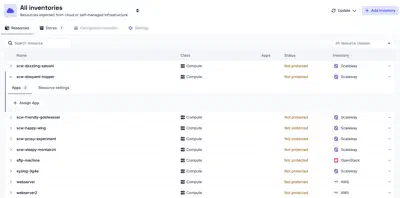
All resources discovered across all inventories are available under Infrastructure -> Inventory -> Resources. From here a resource can be assigned to either a source or a destination app. You can also filter resources by inventories or by resource class.
The actions on each resource include placing a legal hold on it. A resource under a legal hold cannot be used by any task, so backups, restores, checks, and prunes involving it are refused until the hold is removed.
Resource settings
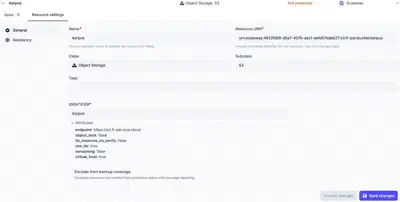
Resource settings can be updated from the Settings tab under each resource, which is split between General and Residency. General holds the settings described below. Residency ties the resource to a country and restricts operations to resources in that same country. See data residency for details.
For managed inventories, most settings are read-only since the resource is managed by the inventory. For self-managed inventories, all settings can be modified. Backup coverage can be modified for any resource regardless of inventory type.
Backup coverage tracks how many of your resources are protected by backups. If a resource does not need to be backed up (for example, a test database), you can exclude it from coverage using the Exclude from backup coverage. Excluded resources are omitted from protection status and coverage reporting.
Resource classification
Each resource is assigned a class and subclass that describe what kind of
infrastructure it is. The class describes the general category the resource
belongs to, while the subclass identifies the specific implementation or
provider. Plakar Control Plane uses this classification to determine which
integrations are compatible with a resource.
Environment and data class tags
A resource can carry its environment and data class as tags. When a source app is created for the resource, Plakar Control Plane fills in its Environment and Data Class from those tags. Both fields can still be changed before the app is saved or even later on.
A tag is a prefix followed by the value. The prefix has a long and a short form,
and either : or = separates it from the value:
- Environment:
plakar:environment:<value>,plakar:environment=<value>,plakar:env:<value>orplakar:env=<value> - Data Class:
plakar:data-class:<value>,plakar:data-class=<value>,plakar:class:<value>orplakar:class=<value>
For example, a resource tagged plakar:env=production and
plakar:class=database gets production as the environment and database as
the data class of its source apps.
The tags can be set in two places:
- On a resource in a self-managed inventory, in its Tags field.
- On the resource at the cloud provider, as a tag or label. A managed inventory picks them up when it discovers the resource.
Supported resources
The following pages document the supported resource types and the configuration required to use each one as a source, store, or destination.