Managing Users
Users represent identities that can access Plakar Control Plane. They are used either by people interacting with the web interface or by applications authenticating to the API. Plakar Control Plane supports two types of users:
- Member: a person who signs in to the web interface and interacts with Plakar Control Plane.
- Application: a non-human identity used by software to authenticate to the Plakar Control Plane API using an API key.
Creating users
You can create either a Member or Application user depending on how the identity will access Plakar Control Plane.
A user exists once in the deployment, but works in an organization only as a member of it. Membership is what allows a user to sign in to an organization and reach its inventories, apps and other objects. What the user can do with them depends on the roles granted in that organization, as described below.
Users are identified by their email address, and that identity is shared across the entire Plakar Control Plane deployment. You add a user to an organization by providing a name and an email address, and the result depends on whether that email address is already known:
- If no user with that email address exists, the user is created and added as a member of the organization.
- If a user with that email address already exists, that user is added as a member of the organization. No new user is created, and the existing credentials remain unchanged.
Permissions are scoped to an organization as well. A user who belongs to several organizations holds a separate set of roles in each one, so the same person can have full administrative access in one organization and limited access in another. Nothing granted in one organization carries over to another.
See permissions for how access is granted, and Managing Organizations for information about managing organization membership.
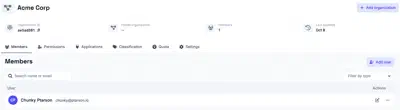
Removing users from an organization
Removing a user from an organization revokes their access to that organization and its resources. Because a user identity is shared across the deployment, the user itself is not deleted and their memberships in other organizations are unaffected.
A user who has been removed from every organization remains in Plakar Control Plane but cannot sign in, because they no longer have access to anything. The account becomes usable again once the user is added to an organization, and the existing credentials continue to work.
Roles are not retained when a user is removed. A user who is added back to an organization starts with no permissions again, exactly like a newly created user, and must be granted the roles they need.
User roles
A user’s access is determined by the role assigned to them within each organization. Because roles are scoped to an organization, the same user may hold a different one in each organization they belong to. A user might administer the AWS organization while only being able to run backups in the VMware organization.
Roles apply to application users in the same way they apply to member users. An application user with no role assigned can authenticate with its API key but cannot do anything with it. See permissions for the roles that can be assigned and exactly what each of them reaches.