Data Residency
Data residency ties a resource to a country and prevents Plakar Control Plane from moving its data anywhere else. Regulations often require that certain data never leaves a jurisdiction, and residency turns that requirement into something the system enforces on every operation rather than something operators have to remember each time they need to perform a task.
Setting a residency
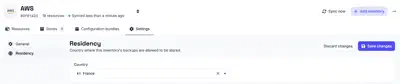
Residency is set on an inventory by selecting the country its data belongs to. This can be modified from the inventory settings. Every resource discovered or added in that inventory inherits it, so an inventory that represents infrastructure in one country only has to be configured once.
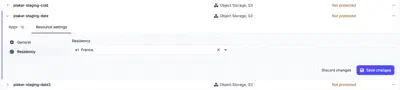
It can also be set on an individual resource, from the Residency tab under the resource’s Settings tab. The General tab next to it holds the other resource settings. A residency set on a resource takes precedence over the one it inherits from its inventory, which covers infrastructure that does not sit in the same country as the rest of the inventory.
What residency constrains
A resource can only be used with other resources that have the same residency. For example, if a source has a residency in France, only stores with a French residency can be selected for its backups. A restore can only use a destination with the same residency as the store, and a sync can only target a store with the same residency as its source.
Plakar Control Plane enforces this when you configure the task, so you cannot use resources with a different residency. This prevents a task from being configured to move data between different countries.
SLA policies follow the same rule. A policy only schedules a backup when the source and its store have the same residency, in addition to matching the policy’s other requirements.
Changing a residency
Policies do not have to be revisited when a residency changes. The policy scheduler re-evaluates what each policy matches and updates the schedules it owns, so a source that no longer shares a residency with the policy’s store stops being scheduled, and one that now does starts.
Residency attestation
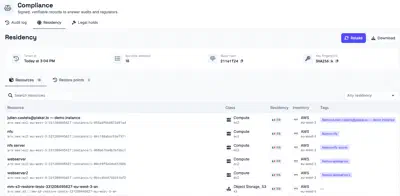
Enforcing residency keeps data in its country, but an audit asks for evidence that it did. An attestation is a signed report of the residency of the organization’s resources and restore points at the moment it is taken. Because the report is signed, it can be handed to an auditor or regulator who verifies it offline, without access to Plakar Control Plane.
An attestation reflects the state at the moment it was taken. Changes made to residency afterwards are not part of it, and a new attestation has to be taken to record them. Each attestation carries the time it was taken, the hash of the report body and the fingerprint of the key that signed it. The hash identifies the exact content of the report, and the fingerprint identifies the key its signature is verified against.
Each record in the report is either a resource or a restore point, captured with the residency it had when the attestation was taken. A resource record also carries the class, inventory and tags of the resource. Restore point records extend the report from the systems being protected to the backups taken of them.
An attestation can be exported as JSONL, CEF or LEEF. JSONL suits
archiving and scripted processing, while CEF and LEEF are the event formats
read by SIEM platforms such as ArcSight and QRadar.