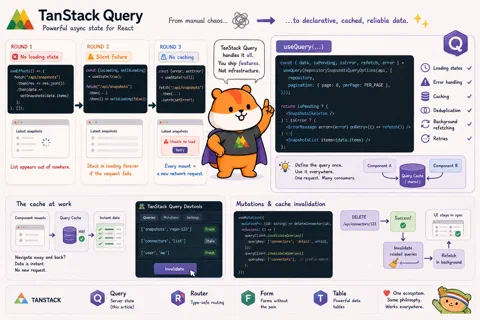


On my previous React projects I used SWR: it came up first in my searches, it was simple, it did the job. When I started Plakar UI, I’d read enough good things about TanStack Query that I decided to give it a shot instead.
That turned out to be a gateway drug. TanStack Query led me to TanStack Router, which led to TanStack Form, which led to TanStack Table. Every library in the suite is built on the same philosophy: fully type-safe, framework-agnostic, and designed for real production use rather than demos. We now use all four in Plakar UI. This is the first article in the series that covers a TanStack library, but definitely not the last.
I’ll say this plainly: if you’re building any kind of UI and you haven’t looked at TanStack, stop reading this and go look. The learning curve is steep. Their APIs are thorough and they don’t hide the complexity. But every hour you put in pays back. We love every single line of code they publish.
OK. Back to Query.
Guess what’s wrong?
Let’s play a game. Here’s a component:
function SnapshotsList() {
  const [snapshots, setSnapshots] = useState([]);

  useEffect(() => {
    fetch("/api/snapshots")
      .then((res) => res.json())
      .then((data) => setSnapshots(data.items));
  }, []);

  return (
    <ul>
      {snapshots.map((s) => (
        <li key={s.snapshot_id}>{s.snapshot_id}</li>
      ))}
    </ul>
  );
}
What’s wrong with this?
…
… Don’t cheat! try to find the problem yourself before reading on.
…
…
No loading state. While the fetch is in flight, snapshots is an empty array,
so the list appears out of nowhere when the data arrives. Not great.
OK, round 2. We fix that:
function SnapshotsList() {
  const [snapshots, setSnapshots] = useState([]);
  const [isLoading, setIsLoading] = useState(true);

  useEffect(() => {
    fetch("/api/snapshots")
      .then((res) => res.json())
      .then((data) => {
        setSnapshots(data.items);
        setIsLoading(false);
      });
  }, []);

  if (isLoading) return <SnapshotsSkeleton />;

  return (
    <ul>
      {snapshots.map((s) => (
        <li key={s.snapshot_id}>{s.snapshot_id}</li>
      ))}
    </ul>
  );
}
What’s wrong now?
…
…
Silent failure. If the fetch throws, the .then chain never runs. isLoading
stays true forever and the skeleton never goes away. The user is stuck staring
at a loading indicator with no idea what happened. We need an error state.
Round 3:
function SnapshotsList() {
  const [snapshots, setSnapshots] = useState([]);
  const [isLoading, setIsLoading] = useState(true);
  const [error, setError] = useState(null);

  useEffect(() => {
    fetch("/api/snapshots")
      .then((res) => res.json())
      .then((data) => {
        setSnapshots(data.items);
        setIsLoading(false);
      })
      .catch((err) => {
        setError(err);
        setIsLoading(false);
      });
  }, []);

  if (isLoading) return <SnapshotsSkeleton />;
  if (error) return <ErrorMessage error={error} />;

  return (
    <ul>
      {snapshots.map((s) => (
        <li key={s.snapshot_id}>{s.snapshot_id}</li>
      ))}
    </ul>
  );
}
What’s wrong now?
…
…
No caching. Every time this component mounts, it fires a fresh request. Navigate away and back: another request. Two components on the same page that need this data: two requests.
Each fix exposed another problem. And I stopped at three, but the full list is longer: no deduplication, no automatic retry on failure, no background refresh when the tab regains focus, race conditions when responses arrive out of order.
Every one of these is solvable with raw fetch. None of them are hard in
isolation. But solving all of them, in every place in your app that fetches
data, and getting it right every time: that’s the part that turns into
infrastructure code nobody wants to maintain.
TanStack Query solves all of it, out of the box, with sensible defaults you can override per-query when you need to.
How TanStack Query works
Here’s the dashboard component that loads the latest snapshots:
// apps/oss/src/components/dashboard/latest-snapshots.tsx
export function CardLatestSnapshots() {
  const { api, repository } = useKlosetAPI();
  const { data, isPending, isError, refetch, error } = useQuery(
    RepositorySnapshotsQueryOptions(api, {
      repository,
      pagination: { page: 0, perPage: PER_PAGE },
    })
  );

  return (
    <Card>
      <Card.Header title="Latest snapshots" buttonProps={button} />
      <Card.Content noPaddingY>
        {isPending ? (
          <Snapshots>
            {[...Array(PER_PAGE).keys()].map((i) => (
              <Snapshots.RowSkeleton key={i} withSources withSize />
            ))}
          </Snapshots>
        ) : isError ? (
          <EmptyList
            illustrationType="sad"
            title="Unable to load the latest snapshots"
            description={error.message}
            actions={[{ children: "Retry", onPress: () => refetch() }]}
          />
        ) : (
          <Snapshots>
            {data.items.map((snapshot) => (
              <Snapshots.Row key={snapshot.identifier.Value} ... />
            ))}
          </Snapshots>
        )}
      </Card.Content>
    </Card>
  );
}
The three problems from our game map directly to isPending, isError, and
data. No loading state? isPending. Silent failure? isError. No caching?
Gone. The skeleton, the error state with a retry button, the actual content:
each branch is one line. Caching, deduplication, background refetching are
handled without any code from us.
We define query options (the key and the fetch function) separately from components, in files next to the API code. Any component that needs the same data imports the same options object. TanStack Query sees the same key, hits the cache, and makes sure only one request goes out regardless of how many components ask for it.
Mutations and cache invalidation
Everything above is about reading data. Writes are the other half of the problem, and the trickier one: a successful write means some of your cached data is now wrong.
Here’s the real useRemoveConnector from Plakman:
// apps/plakman/src/api/connectors/mutations.ts
export const useRemoveConnector = ({ urnId }: { urnId: string | null }) => {
  const queryClient = useQueryClient();
  return useMutation({
    mutationFn: (id: string) => deleteConnector(id),
    onSuccess: () => {
      if (urnId) {
        queryClient.invalidateQueries({
          queryKey: resourceKeys.detail(urnId),
        });
      }
      queryClient.invalidateQueries({
        queryKey: resourceKeys.lists(),
      });
    },
  });
};
When the DELETE request succeeds, invalidateQueries marks those cache entries
stale and triggers a refetch. resourceKeys.lists() uses prefix matching. It
invalidates every query whose key starts with that prefix, so paginated list
pages, filtered views, all of it refreshes. One onSuccess callback cleans up
all the relevant state.
If you’ve run the development version of Plakar and noticed something odd, for
example you edit a connector and the list doesn’t update, or you remove one and
it still shows up, that’s almost always a cache invalidation bug. The mutation
succeeded, the API updated its state, but the onSuccess callback either didn’t
invalidate the right key or missed one. The fix is always the same: find the
query key that’s still serving stale data and add it to the invalidation list.
This isn’t a tutorial
Everything above covers why we use TanStack Query. It’s not a complete picture of what it can do.
In Plakar UI we also use:
useInfiniteQueryfor data that loads incrementally. The snapshot file browser uses it to load directory contents page by page as you scroll- A global
staleTimeof 5 seconds so parent and child components mounting together don’t each fire their own request for the same data - Per-query retry logic that distinguishes transient network failures (retry) from Zod parse errors or 4xx responses (don’t bother)
throwOnErrorto route 401s to a React error boundary instead of handling them in every component- The TanStack Query Devtools in development: a live panel showing every query in the cache, its current state, and a button to manually invalidate it; the first place to look when cache invalidation isn’t behaving as expected
The TanStack Query docs cover all of this in depth and are among the best library docs I’ve read. If you want the full picture, that’s where to go. The goal here was just to show why a data-fetching library is necessary and why this one in particular.
Next up: TanStack Form. Same ecosystem, same philosophy, applied to form state.