

The cloud didn’t repeal the oldest rule in data protection: you need offsite backups. It just made it easy to forget. Most teams now keep their primary data, their backups, and their recovery path with the same provider, in the same account, reachable exactly one way. That’s convenient right up until the moment it isn’t.
We’ve gotten very good at making infrastructure resilient: autoscaling, health checks, failover between regions. But almost all of that lives on the process side, not the data side. Software exposed to the internet will be compromised eventually, no matter how you isolate it, and the last line of defense you have left is whatever you backed up and can actually restore.
An independent backup fixes that. By independent, we mean a copy that:
- You control, encrypted with keys you hold, not the provider,
- lives in a separate failure domain: a different account, region, medium, or network, and
- is stored in an open, portable format, so it restores anywhere, on your terms.
This is the modern reading of the classic 3-2-1 rule: keep 3 copies of your data, on 2 different types of media, with at least 1 stored independently of your primary environment. The updated version people use today, 3-2-1-1-0, adds one immutable or offline copy and 0 recovery errors (meaning you’ve actually tested a restore).
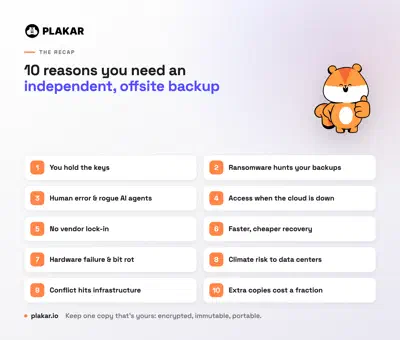
Here are 10 reasons why you should consider independent copies of your important data:
1. You hold the keys: privacy, compliance, and data governance
Control doesn’t come from where data sits. It comes from who holds the encryption keys and who can access it. Cloud providers offer strong security tools, but their trust boundary includes them: the provider, its operators, and anyone who compromises either.
An independent backup, encrypted client-side with keys you own, gives you provable custody of sensitive data: customer PII, medical records, financial data, IP. For a healthcare provider under HIPAA or a law firm holding privileged client files, being able to show auditors “we hold the keys, the provider is blind to the contents” is a stronger governance story than any shared-responsibility checkbox.
2. Ransomware and account compromise
Start from a hard assumption: any system exposed to the internet will be compromised eventually, no matter how well you isolate it. When it happens, the only thing standing between you and a total loss is a backup the attacker can’t reach. And attackers know it.
A cloud admin credential is the keys to the kingdom. Modern ransomware crews don’t just encrypt production, they hunt for your backups first, because deleting your recovery option is what gives them leverage. Sophos found that in 94% of ransomware attacks the criminals tried to compromise the victim’s backups. They’ll wipe snapshots, empty buckets, or encrypt everything with their own keys and offer to sell yours back.
The real defense isn’t being “off-cloud.” A network-connected NAS on a compromised network gets encrypted too. It’s isolation plus immutability. Cloud object-lock helps, but it often lives in the same account and trust domain the attacker already controls. A genuinely independent copy, immutable, in a separate credential domain, ideally air-gapped, is the one thing they can’t reach or rewrite.
3. Human error, and now AI agents
Not every threat is an attacker. Someone fat-fingers a delete, overwrites a file with the wrong version, or runs a script against an S3 bucket that never had versioning enabled. Native version history helps, but it has retention limits, it can be turned off, and the damage often isn’t noticed until it’s too late.
There’s a new twist on this in 2026. The line between “trusted insider” and “hostile actor” has blurred, because a growing share of destructive actions now comes from automation. Teams run AI coding agents in auto or “YOLO” mode, hand them API keys, and give them the same Docker and shell access a senior engineer has, which on most machines is an escalation path straight to root. An agent that drops a production database or wipes a directory to “fix” something isn’t malicious, but the outcome is identical to an attack: the data is gone. You can’t reliably enforce a no-agent policy, so the only safe assumption is that some process, human or not, will eventually destroy data it had every permission to touch.
An independent backup preserves historical copies outside the normal workflow, so a mistake made on Monday, by a person or an agent, is still recoverable long after your cloud retention window has rolled off.
4. Access when the cloud is unreachable
Three different failure modes share one symptom: your data is fine, but you can’t get to it.
- Provider or regional outage: a software bug or network fault takes a region offline.
- Account lockout: a billing dispute, a policy or fraud flag, or a legal hold freezes your account while it’s “under review.” Your files are there; your access isn’t.
- No connectivity: a remote job site, a field team, or a region hit by severe weather simply can’t reach the cloud.
A short interruption still stalls sales, support, and operations. An independent copy you can reach on your own terms keeps the business running while the dependency you don’t control gets sorted out.
And it can be worse than a temporary lockout. In 2024, a Google Cloud misconfiguration deleted UniSuper’s entire cloud subscription, taking a $125 billion pension fund offline. It came back only because it had also kept an independent backup with a different provider.
5. Freedom from vendor lock-in
Storage you’ll keep for years or decades shouldn’t be hostage to one provider’s pricing, APIs, or proprietary format. The trap is rarely a single decision. It’s egress fees plus a format you can’t easily read anywhere else, which together make leaving expensive enough that you don’t.
An independent backup in an open, portable format is your exit ramp. When pricing changes or priorities shift, you migrate at your own pace instead of under pressure, because your data was never locked in to begin with.
6. Faster, cheaper recovery at scale
Cloud storage is great for keeping data. It’s slow and pricey for getting a lot of it back. Restoring hundreds of terabytes over an internet connection can take days or weeks, and the egress and bandwidth bills add up fast. If your recovery-time objective (RTO) is measured in hours, an internet-only restore blows past it before you’ve pulled the first terabyte.
Be honest about the tradeoff: a local restore isn’t instant either, and you need somewhere to land the data. But a nearby, deduplicated copy shrinks both sides of the problem: fewer physical bytes to move, and a fraction of the transfer cost. When “download everything again” isn’t practical, the independent copy is what turns a multi-week recovery into a same-day one.
7. Hardware failure and silent data corruption
Drives wear out and silent corruption creep in over time. And redundancy doesn’t save you: replication faithfully copies corruption to every replica. Redundancy is not integrity.
An independent backup with real integrity verification, checksums and content-addressed storage that can prove a copy is byte-for-byte what you stored, lets you detect corruption and restore a known-good version, not just another copy of the damaged one.
There’s a related trap: a backup you’ve never restored isn’t a backup, it’s a hope. Plenty of teams discover at the worst possible moment that their “geo-replicated” data was really just rsync on a schedule, and a silent error meant weeks of snapshots went nowhere. Ask an engineer “when did you last test a restore?” and watch the confidence drain. It is not rare: after a ransomware attack, a French hospital discovered its server’s backup system had never actually worked, leaving no usable archives to restore.
8. Climate change is putting data centers at physical risk
Data centers are physical buildings full of heat-sensitive hardware, and the climate they operate in is getting harsher. In July 2022, a heatwave knocked Google Cloud and Oracle data centers in London offline when multiple redundant cooling systems failed at once. Floods, wildfires, water scarcity that starves cooling systems, and seismic activity all threaten the same physical layer. Sometimes it is brutally simple: in 2025, a data-center fire destroyed 858 TB of South Korean government records that had no backup at all.
The catch: these are correlated, regional events. In-region redundancy doesn’t help when the whole region is under a heat dome or a flood. An independent copy in a different geography and climate zone is what survives when the map turns red.
9. Conflict and attacks on physical infrastructure
Digital infrastructure has become physical infrastructure worth targeting. In recent conflicts, data centers, and the fiber and subsea cables that connect them, have been damaged or deliberately hit. Cable-cut incidents in the Baltic Sea and the Red Sea have disrupted connectivity for entire regions at a time. In 2026, drones struck Amazon’s cloud data centers in the Gulf, the first deliberate strikes on private cloud infrastructure, taking banking and enterprise services offline across the region.
This isn’t about any one country. It’s about concentration risk. If your data and its recovery path depend on infrastructure clustered in a contested region, or on a handful of cables, that’s a single point of failure someone else controls. An independent copy held outside that blast radius, in a portable format, is strategic autonomy: your ability to recover doesn’t depend on geopolitics staying calm.
10. Keeping extra copies costs a fraction, not a multiple
The obvious objection to all of this is cost: if one copy is expensive, surely three copies are three times worse. They would be, except that independent copies are mostly the same data you already have. Deduplication stores each unique block once, so a second or third copy adds only what actually changed, not another full footprint.
Plakar is built around this. Its content-defined chunking splits data into variable-sized blocks, keeps only the unique ones, and compresses what remains, reaching up to ~90% storage reduction. The hard part is doing that on encrypted data: most tools force a choice between encryption and deduplication, because you can’t dedupe bytes you can’t read. Plakar deduplicates across fully encrypted snapshots, so you keep zero-trust security and a storage bill a fraction of the size. Storing less is greener, too: it cuts the energy and water behind your data, no small thing when data-center electricity is set to more than double by 2030. That one capability is, on its own, a reason to run Plakar, and it’s what turns “keep an independent copy” from a budget fight into an easy call.
“But isn’t a second backup a hassle?”
Historically, yes. “Offsite backup” meant tapes in a van, per-workload agents, and a lot of babysitting. That reputation is out of date. A modern independent backup uses one open format across VMs, databases, Kubernetes, and object storage, needs no agents, and deduplicates so aggressively that the copy you keep (and the data you move to restore it) is a fraction of the logical size. It can be declared as code and automated like the rest of your infrastructure. The second copy is far cheaper and lower-effort than the old “offsite” reputation suggests.
Where to start: rank your data by regret
You don’t have to protect everything the same way. The practical first step is an honest value assessment: for each dataset, ask how much it would hurt to lose it, or to lose an hour, or a day, of it. Most people shrug at “my files” until they picture losing every photo they’ve ever taken. Sort your data that way and the critical 20% becomes obvious, along with how many copies, how often, and how far apart each tier is worth. Then let deduplication make the expensive tiers cheap enough that you don’t have to cut corners on the data that matters.
The bottom line
This was never really cloud versus not-cloud. It’s dependence versus independence. One provider, one account, one region, one network is one point of failure wearing four disguises. Keep at least one copy that’s yours, encrypted with your keys, immutable, portable, and reachable on your terms, and a catastrophe becomes an inconvenience.
That’s exactly what Plakar is built for: open-source, encrypted-deduplicated, immutable Kloset snapshots in a portable format you can self-host anywhere (on-prem, any cloud, or fully air-gapped) with the Kloset Vault Protocol so you can even outsource storage to a provider that stays cryptographically blind to your data.
Try it free: plakar.io and run plakar backup on your first workload
in minutes.